Device Info Edit
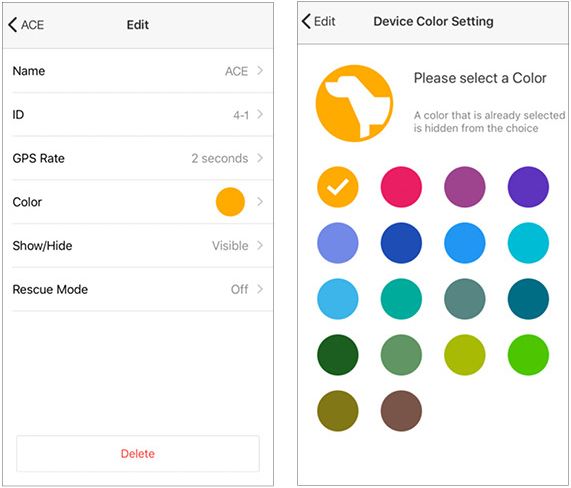
Edit
Press the Edit button to change device settings.
Name
Press Name to edit the device name.
ID
The GPS Collar ID can be changed. Change the ID when the signal conflicts with another GPS Collar. The ID of devices that are shared with you cannot be changed. The first number in the ID is the channel and the second number is the order. Do not use the same ID for additional GPS Collars.
GPS Rate
The GPS update rate can be changed for each device with options for 2 seconds, 6 seconds, 10 seconds, 30 seconds, and 120 seconds. The update rate of devices that are shared with you cannot be changed.
Color
The color associated with the GPS Collar can be changed. The device color is used in the icon, tracks, compass needle, and in the Device List views.
Collar Show/Hide
Hide or show a hidden device.
Rescue Mode
Turning on Rescue Mode activates when the GPS Collar battery life is at 25% or less. The device is placed in sleep mode, and the update rate is changed to 120 seconds to reduce power consumption. The rescue mode setting cannot be changed for devices that are shared with you.
Delete
Delete removes the pairing between the GPS Collar and GPS Connector, or removes from the app devices shared with you. To add the GPS Collar back, the GPS Collar and GPS Connector will have to be paired. Previously shared devices will need to be shared again.
Did it help ?
Didn't find what you were looking for? Try looking on the FAQ